The Killer Mind

Thursday, November 5, 2015

Is Your Site Ready For Paid Traffic

5:57 PM 0
Is Your Site Ready For Paid Traffic
If you read a basic introduction to paid advertising it’s often portrayed that setting up a PPC account is as easy as writing an advert, point it to a URL and go! At a very basic, primal level they are probably right.track your visual content
However, what these guides don’t perhaps go in to as much detail about is the landing page of your traffic is as important to your PPC campaigns success as the adverts and keywords you pay to receive traffic from.
Your site/landing page plays a big part in the Adwords quality score, which directly effects how much you pay per click. The site also has the job of acting as your online sales team – providing enough information to interest a user, then guiding them to a purchase or enquiry.
I could wax lyrical for many pages about how important your site and how important it is, but you’re reading a post about whether your site is ready for paid traffic so lets assume you already know this.
Without further delay please see below our watch list for the top site elements to be sure you’re on point otherwise they will affect the performance of your PPC campaign.
  1. Site Speed – Google states that landing page experience directly affects your quality score and outside of poor design there is one factor which ruins user experience; poor site speed.
If your site is sluggish or takes an hour to load then chances are users are leaving your site pretty sharpish, which isn’t ideal, especially if you’re paying for that traffic. But don’t just take my word for it Search Engine Land wrote an article on exactly this with supporting case studies: Click Here
In order to improve your site speed you could consider:
  • Compressing the sites JavaScript & CSS
  • Ensure images file sizes aren’t unnecessarily big
  • Place your site on a dedicated server.
  1. Mobile Optimised – Since Adwords moved over to enhanced campaigns, you can’t decide to opt out of mobile traffic, you can only choose to bid less for it. Therefore it’s inevitable a decent percentage of your traffic will now be via mobiles.
If your site isn’t optimised for mobile devices you’re going to miss out on conversions and paying for traffic that struggles to navigate your site. A responsive site will help improve user experience and not only feed back into your Adword quality score but means user should stick around, increasing the chance of a conversion.
  1. Relevant Content – One of Google’s buzzwords whether it be PPC or organic rankings isrelevance. Is your content original and relevant to the search terms your asking to rank for/advertise on?
With Adwords, you can choose which landing page you send your ads traffic to and increase the relevance for your visitors. How relevant your assigned landing pages content is to the keywords not only affects your quality score but also how users behave once on site. Always ensure you have relevant & useful content on pages you are sending PPC traffic to, otherwise it will cost you more per click and the results won’t be as good.
  1. Redirects – Having a redirect in place won’t necessarily affect the PPC campaigns performance directly unless coupled with a slow site. However, if your ads are still being directed to a URL that is now redirected to another this can cause issues with tracking in analytics.
How can you improve and report on a PPC campaigns performance properly if your sites analytics isn’t recording PPC traffic accurately?

A Content Marketing Overview of BrightonSEO for Those Who Couldn’t Attend

5:55 PM 0
A Content Marketing Overview of BrightonSEO for Those Who Couldn’t Attend
We trekked over to Brighton for one of the biggest SEO marketing conferences in the UK – BrightonSEO – and what a buzz there was! By 8am there was a flux of Content Marketers, Outreach Consultants, Account Executives and SEO savvy experts waiting to get in and begin enhancing their SEO knowledge!

Key Takeaways

  • Before you plan promotion, you need to know why you are promoting this piece of content, for example is it to gain links? Is it to obtain further interaction via Social? For direct conversions? To gain new customers? Or to grow your existing customers?
  • Outreaching alone isn’t enough – if that’s the only way you’re getting your content out there, than you need to do more.
  • Find out where your audience is searching for content and what they are reading – this can be done through YouGov.co.uk, Facebook Audience Insights and Google AdWords.
  • Messaging and headlines are key because people don’t read entire posts, the majority of people just read headlines! Ensuring your headline is eye-catching and appealing is a must – 1.7 million people won’t care about anything else!
President
  • This is something we already know but is extremely important – reviews. You must encourage customers to leave only positive reviews and discourage the negative. This will happen from providing customers with an excellent service, as well as a little push towards the reviews page!
  • Follow the news and write about things affecting the customer’s industry on their Social channels.
  • My favourite key takeaway was this: Social media does not take the weekend off! Yes we work weekdays, however we should be tweeting and writing posts on weekends too. Most companies make the common mistake of not writing the whole weekend, and leaving it until Monday morning.However, this is the time that people go onto Social Media channels such as Facebook and Twitter the most – and we all know how quickly social buzz can fizzle out, so make the most of the likes and shares.
Brighton SEO image

Favourite Speaker of the Day

My favourite speaker of the day was Stacey MacNaught who spoke about when your content is awesome, what the next stage is in order to get it to the top. Cathal Berragancame in close second, with his talk about how to gain millions of followers on Twitter!

Summarise Brighton in 5 Words

Informative Wealth of Content Delivered!

Quote of the day

“Outreach is a promotion technique, if the only thing you are doing is outreaching, then you’re not doing enough”. Stacey MacNaught

Round-up of the Best Talks of the Day

Your Content is Awesome – Now What? – Stacey MacNaught
This was a very informative talk about how having good content is important, but the way you get it out there is becoming increasingly vital in getting readers engaged with what you’re saying.
Lessons Learned on the Way to Half of a Million Twitter Followers – Cathal Berragan
It was great to get a view of work from such a young and enthusiastic Content Director, Cathal, who spoke about how he started a Facebook page called ‘Exam Problems’. Thousands of young people joined and wrote within the group, because they were all going through the same situation, which he then went on to sell for a profitable amount of money – and all of this began from simply having good content!
Dave Trott - Brighton SEPO
Dave Trott was the closing keynote speaker. He talked about how there are always new devices coming out, but the person is the media – we are the ones who decide whether a device is good or not, and we decide if it should get passed or not. He also spoke about how there are two types of people – the formers and the followers. Formers do the talking and have a range of opinions, and the followers, well…follow! The key thing about followers is that they want to stay out of the spotlight so will follow content/social trends.

Magento 2 Extension Development with Composer and Git

5:53 PM 0
Magento 2 Extension Development with Composer and Git
If you’ve developed Magento extensions before and installed them with Composer then you’ll be pretty familiar with what I’m about to go through as Magento 2 modules can be developed in a similar way. I also know lots of people in the community use Modman to develop their Magento 1 extensions, which keeps everything nice and separate. Due to the way Magento 2 modules are now packaged I no longer need Modman, so I decided to share the methodology that I use.
This is aimed as a beginner’s guide, so I hope it will help out those getting started with Magento 2 extension development. If you have any improvements/suggestions let me know in the comments.
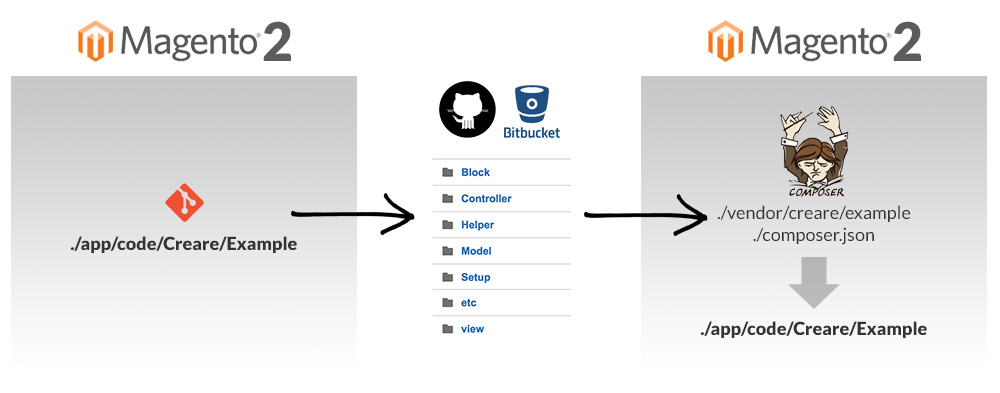
Magento 2 Extension Development Workflow
My Magento 2 Extension Development Workflow

1 – INSTALL MAGENTO 2

You must install Magento 2 (using Composer) first – this will be the Magento 2 installation that we use for our extension development. If you’ve not done this before, here’s a blog postI wrote a few months back.

2 – CREATE LOCAL & REMOTE REPOSITORY

Using your preferred Git provider (such as GitHub or BitBucket) you’ll need to create a repository for your module. Back to your local Magento 2 installation, all module files are now stored within app/code – there’s no longer any local/core/community codepools.
Navigate to app/code and create your ‘vendor’ name, and inside that put your module name. In this instance I’m going to call my module ‘Creare/Example’. The folder path to your extension will now be the following, so navigate into this directory:
?
1
app/code/Creare/Example
Now, we want to connect to our remote repository using the following Git commands:
?
1
2
git init
git remote add origin https://github.com/user/repo.git

3 – CREATE MODULE

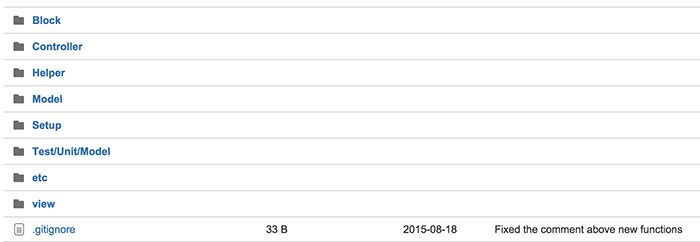
Here’s the easy part – you just need to create your extension. The fact that all your module files are contained within one directory really is beautiful. I’m not going into any detail regarding module development in this tutorial as I’m simply explaining my workflow. Make sure you’ve pushed all your work to your remote repository, it should look something this:
Repository Contents

4 – CREATE COMPOSER.JSON

In order for your module to be compatible with Composer it must include a composer.jsonfile so create one of these within your module directory root and push this to your remote. The contents of your composer.json file should include the following as a minimum:
?
01
02
03
04
05
06
07
08
09
10
11
12
13
14
15
16
17
{
    "name": "creare/example",
    "description": "My awesome example extension",
    "require": {
        "magento/magento-composer-installer": "*"
    },
    "type": "magento2-module",
    "version": "2.0.0",
    "extra": {
        "map": [
            [
                "*",
                "Creare/Example"
            ]
        ]
    }
}
We’re basically saying here that our module is called ‘Creare/Example’, it requires and depends on the Magento Composer Installer to work, it’s a Magento 2 module and it’s currently in version 2.0.0. We’ve also told it to map all of its contents into Creare/Examplewhich is our vendor/module path within app/code.

5 – INSTALL MAGENTO 2

You may ask why I am installing Magento 2 again – well, this installation will serve as an example of how your extension can be installed on other Magento 2 websites using composer.

6 – EDIT COMPOSER.JSON

Once you’ve installed Magento 2, you need to go to the root and run the following command to install Magento Composer Installer (the package that our extension is dependent on):
?
1
composer require magento/magento-composer-installer
You now need to edit Magento 2’s composer.json file by writing the following code that will add your module:
?
1
2
3
4
5
6
"repositories": [
   {
     "type": "vcs",
   }
 ]
If your module is still in development then also change the following code withincomposer.json from stable to dev:
?
1
"minimum-stability": "dev",

7 – INSTALL MODULE

Now, simply run the following composer command to install your module:
?
1
composer require creare/example
From this point onwards you can use composer update to fetch updates made to your module.
If all has gone well you should now see your module in app/code using the exact folder path that you specified. Now enable your module by editing app/etc/config.php and adding:
?
1
'Creare_Example' => 1,

Daily News